Wednesday, October 20, 2010
Sadiq's Blog: ATX Power Supply Repair And Troubleshooting Secret...
Sadiq's Blog: ATX Power Supply Repair And Troubleshooting Secret...: "I had stopped repairing ATX power supply many years back due to the new one cost very cheap. It’s not worth to repair it because the spare..."


ATX Power Supply Repair And Troubleshooting Secrets That You Should Know

I had stopped repairing ATX power supply many years back due to the new one cost very cheap. It’s not worth to repair it because the spare parts sometimes were much more expensive than getting a new power supply. Searching for ATX power supply spare parts was not easy as many of them you can’t even find them on the internet. Not only that, many complicated and different designed by power supply manufacturers had eaten up our precious troubleshooting time too because of we need time to understand how all these different designed power supply work.
Some of the power supply designs were using the PWM IC (UC3842) and power FET, some use the double transistors while some use only a single power IC in the primary side. Because of the manufacturers wants the design to be made into compact size, many secondary or even primary power supply circuit were build into a modular board (smaller board). This made troubleshooting even more difficult because many times the meter’s probe can’t reach to the testing point.
The real reason why I had stopped repairing ATX power supply was the profit margin. If you charge to high the customers rather buy a new unit with one year warranty given. If you charge too low, you may end up in the losing side because of the components replaced, electricity and etc. If you charge reasonable, the profit margin gained can’t even cover your time spent on troubleshooting it. I’m here not to discourage you to stop repairing ATX power supply, however if you have the time, have contacts getting cheap power supply components, easy to access many power supply schematic diagrams and etc then you may go ahead to repair it.
Okay back to the article, one of my customers had asked me to repair his ATX power supply. I told him to get a new one (since it was very cheap) but he said he couldn’t find one that suits his customer’s CPU. He wanted a power supply that is either same size or smaller then the original one with same or higher specification but all he could find was a standard size power supply!

As a favors to my customer, I would do my best to help him to repair the ATX power supply. When the power supply was switch on, measurements were taken. The results were over voltage. The 12 volts line shot up to 13 + volt and the 5 volts line became 5.6 volts. After the casing was removed, I found the inside was very dirty and I used a vacuum cleaner and a brush to clean off the dirt. Then I saw four filter electrolytic capacitors had bulged at the top casing.


As you know, we as electronic repairers can’t just see things at only one side; we have to see the other sides too. What I mean was, try to see if there are any suspicious components that contributed to the failure of the power supply such as broken components, dry joints, loose connection, decay glue and etc before start checking the suspected area.

What I saw was at the primary side there were some components covered with decayed glue as seen in the picture. I have to carefully remove it by scrapping off the layers of the decayed glue while preserving the outer layers of the components. Once it was done, I clean it with the Thinner solution. Decayed glue could cause serious or intermittent problem in electronic equipment because it can be conductive.

If you repair any ATX power supply, make sure you check the fan too because some power supply failure was due to heat caused by a faulty fan. The purpose of the fan is to suck out all the heat generated by the components inside the power supply. In order for the fan to run smooth, you can service it by using a Philips oil base spray as shown in the photo.

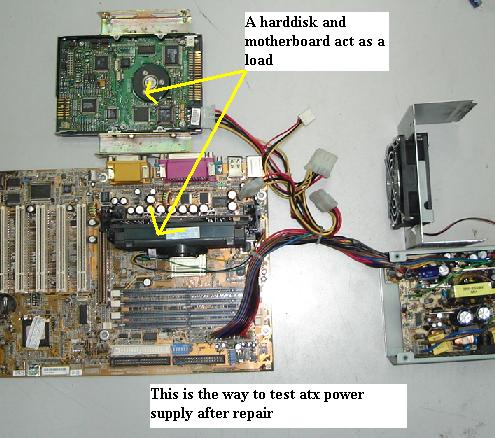
Once the four electrolytic capacitors were replaced and the decayed glue removed, I then have to plug it into a junk motherboard together with a hard disk to test the performance of the ATX power supply and measure all of its output voltages. It seems like the output voltages were back to normal. Once everything is okay I then test it in a working CPU to check for the display.

The reason I test it with a junk motherboard first as a way not to cause my good motherboard to go bad just in case if the output voltages is still very high. Better safe than regret later. By the way you can’t test a power supply without load otherwise it may turned on for a while and then shut down. If you do not have a junk motherboard you can always at least connect a hard drive and a wire jumper to its connector to turn on the ATX power supply.

Do you know that most ATX power supply is using dual Schottky barrier rectifiers to convert the ac wave into DC voltages? Even in LCD Monitor power supply, a dual Schottky were used in the rectification too. For your information, checking Schottky diode is different from checking a normal diode. With analog meter set to X10 K ohms, it should show some leakage reading when doing the reverse bias test. If this component becomes faulty it is very easy to get a replacement, of course you have to get one with the right specification. That’s all for today, hope you enjoy the article and come back more often to check out for any latest repair techniques that I’m going to share to you.

Saturday, October 16, 2010
SMPS (SWITHING MODE POWER SUPPLY)
SMPS - A switched-mode power supply (switching-mode power supply/SMPS or simply switcher) is an electronic power supply unit (PSU) that incorporates a switching regulator in order to provide the required output voltage.

Every electrical or electronic device needs power for work and the computer is not exception to it. Computers, too, have a particularly designed power supply component known as Switch Mode Power Supply (SMPS). SMPS converts raw input power to controlled voltage and current for the operation of various components of the computer. SMPS uses switches for high efficiency. The primary function of SMPS is to convert the alternating current (AC) power available in homes into direct current (DC) required for a computer system. In desktop computers, a metal box found in the corner of the CPU case supplies power to various components in the CPU box. The power supply converts 115-230 volt AC into DC that is required for computer components to work.

The terms such as voltage, AC, DC, etc., are closely associated with the power supply or SMPS.
Voltage is an electric potential difference between two points and is measured in volts.
AC stands for alternating current. It is an electric current whose magnitude and direction vary cyclically.
DC stands for direct current. It is considered as the constant flow of electrons in a single direction from low to high potential. Computers use DC power. Because of the advantage of alternating current over direct current in transforming and transmission, electric power distribution today is nearly everywhere alternating current.
The SMPS or power supply of a computer comes in different form factor styles. The form factor refers to the physical dimensions of a component. The form factor of the power supply must match with the form factor of the computer case into which the SMPS is inserted. There are various industry standard form factors available. Some of the commonly used form factors with their characteristics are given below:
- · LPX
- · ATX
- · SFX
The LPX form factor style power supply has exactly the same motherboard and disk drive connectors as the previous standard power supply form factors. LPX form factor power supply differs in its reduced size that allows building much smaller and consumer oriented PCs. Due to their small size, they can be put into almost every type of computer cases.
The ATX form factor is developed by Intel in 1995. ATX is similar to LPX in physical dimensions. The difference between the two is that the power pass through-outlet for the monitor has been removed from ATX. Another difference is that in ATX, the cooling fan is mounted along the inner side of the power supply. With this kind of arrangement, the fan draws air in from the back of the chassis and blows it inside across the motherboard.
The SFX form factor style power supply is 100 mm wide, 125 mm deep, and 63.5 mm in height. It includes a 60 mm power supply fan for cooling. The main SFX motherboard connector is in the same shape and size as the ATX connector. The one difference here is that the SFX power supply specification does not support the -5V compatibility voltage and, therefore, should not be used with motherboards that have ISA slots.
Each SMPS or power supply on a computer contains a connector that connects to the motherboard, which supplies power to the system processor, memory, and all add-on cards connected to slots such as ISA, PCI, AGP, etc.
Industry standard PC, XT, AT, and LPX motherboards use the same type of main power supply connectors. They use two main power connectors: P8 and P9. Each of the P8 and P9 connectors has 6 pins that connect power supply to the motherboard.

ATX main power connector is used to connect to the power connectors on the ATX, SFX, and in all ATX based motherboards. ATX main power connector is a 20-pin connector with a square hole for pin #1 and round holes for the other 19 pins.

ATX auxiliary power connector is a 6-pin connector. Intel designed this to fulfill the additional power requirement of motherboards, e.g., a motherboard that requires 18A of +3.3v or 24A of +5v power. A higher level of power is required when power supply system is using 250 watt to 300 watt supplies.
ATX12V power connector provides localized power to the CPU, while the AUX connector provides additional power mainly to the AGP card.
The computer components and circuits such as motherboard, adapter cards, and disk drive logic board use +3.3v or +5v, and the disk drive motors and cooling fans require +12v power. The components that require voltage level other than this are powered through onboard voltage regulators. These voltage regulators are built into the motherboard.
Different view of SMPS --

A Switch Mode Power Supply

The Back Portion of a Switch Mode Power Supply Section
Power Good Signal: The power supply not only converts AC to DC but also ensures that the system does not run unless the power supplied is proper. Power supply conducts an internal check before the computer starts. If the check is successful, it sends a signal called Power Good to the motherboard. The Power Good signal is present in the system. When the AC voltage dips and the power supply is unable to provide outputs, the Power Good signal is withdrawn and the system is reset. The Power Good signal is a +5v active high signal, which is supplied to the motherboard after the internal checks have been successfully performed. The processor timer chip present on the motherboard that controls the reset line receives the Power Good signal. After receiving the signal, it releases the reset line, and the CPU starts executing the code present at FFFF:0000 memory address (ROM BIOS).
Power supply transmits power not only to the motherboard but also to the floppy disk drive, hard disk drive, and CD/DVD drive and other devices. A four-wire connector is attached at the back of each drive. The four wires provide +5v, +12v power, along with two grounds, to the various drives that use them. The connectors are available in two different sizes. The large size connector known as Molex is used on most internal drives, including hard disk, CD/DVD, Zip drives, and the older 5.25″ floppy disk drives. The smaller size power connector, called as Berg, is used for the newer style of 3.5″ floppies.

Serial-ATA (SATA) power connector is used to provide power to SATA hard disk drives.

The number of power connectors on the power supply varies with the type of power supply. If the power supply is large, the connectors are more in number so that more devices can be attached to it.
Power supplies have many other specifications and features to protect computers. A good power supply should have very low current leakage, i.e., less than 500 micro amps, to ground.
While adding add-on cards or other components on a computer, a technician should make sure that the power supply is not overloaded. Most of the time the power supply is overloaded by filling up the expansion slots and adding more hard disk or CD-ROM drives. Today’s processors may also have high current requirement for the +5v or +3.3v supplies. Therefore, when selecting an SMPS for a computer, technicians should have future system upgrades in mind.
In case of a defect or problem with power supply, it is not recommended that an inexperienced user open a power supply for repairing. The power supply has dangerously high voltage. Even after unplugging, power supplies can retain dangerous voltage and must be discharged (like a monitor) before servicing it. These internal repairs are not recommended unless the technician is specially trained to repair such components.Tuesday, October 12, 2010
Sadiq's Blog: How To Download Facebook or Youtube Videos Without...
Sadiq's Blog: How To Download Facebook or Youtube Videos Without...: "Have you ever liked a video shared by your friend on facebook and wanted to download it…Well this this tutorial is not only for facebook or..."
How To Download Facebook or Youtube Videos Without Any Tools..
Have you ever liked a video shared by your friend on facebook and wanted to download it…Well this this tutorial is not only for facebook or youtube instead it can be used for any video streaming website like metacafe,dailymotion,veoh or yahoo videos.There are websites on the internet that will convert your video link into a download link but it has the following drawback
- If you already watched the whole video and then you decide to download it to your computer it will take double time because you already have spent time watching it and now have to spend time downloading it to your hardrive.
- Moreover, the download speeds are very slow and its very irritating to download the whole video again.
But if you have already played the whole video on the site then there is no need to waste the time on downloading it again.We simply have to locate the cache folder of the browser as when the video is streamed it is automatically saved in the cache folder and just have to copy paste the video file from cache folder to your desired location in your computer.
Before reading this tutorial make sure that you have uncheck the hide files and folders box.If you dont know how to unhide files and folders..
Here is the step by step tutorial with screenshots on how you can locate the cache folder for various browsers in various operating systems
Case 1:Google Chrome
For windows Vista and Windows 7
If you use Google chrome in windows vista or windows 7 then here is the location of the cache folder
C:\Users\USER_NAME\ App Data\Local\Google\Chrome\UserData\Default\Cache
C, being the system root. If you are not sure about the system root you can replace C: with %systemroot%.
Also donot forget to replace USER_NAME to your windows username
For Windows Xp Users
In windows Xp the google chrome cache folder can be found at
C:\Documents and Settings\USER_NAME\Local Settings\Application Data\Google\Chrome
CASE 2:Mozilla Firefox
For Windows 7 and Windows Vista
The temporary cache folder can be located at
C:/Users\USER_NAME \AppData\Roaming\Mozilla\Firefox\Profiles
For Window Xp Users
The temporary cache folder can be located at
C:\Documents and Settings\USER_NAME \Local Settings\Application Data
CASE 3:Internet Explorer
In case of Internet Explorer you need to go to Tools>Internet Options and then in Genreal tab click on Settings button

A new window will popup in front of you now click on View Files button.

How To Find Your Video In Cache Folder
Once you have found the cache folder of your browser the next thing you have to do is locate your video file.To do this arrange the files of the folder according to their size because video files are usually large in size.Open the largest files with Vlc player.Once you have found your video just copy it to your desired location.
Note:There are usually Some data files with names like data_1 in cache folder.Donot open them with Vlc open the rest of the files with Vlc and you will easily find your video.
Note:Make sure that you replace the USER_NAME with your windows username in the above addresses
Saturday, October 9, 2010
Sadiq's Blog: How to Increase RAM capacity using USB Flash Drive...
Sadiq's Blog: How to Increase RAM capacity using USB Flash Drive...: " Random Access Memory (RAM) is used to hold data temporarily in the computer. The more applications that we open, the more RAM is..."
How to Increase RAM capacity using USB Flash Drive

Random Access Memory (RAM) is used to hold data temporarily in the computer. The more applications that we open, the more RAM is also used. There are ways to add RAM to take advantage of the flash (data storage), with additionalsoftware (application) eBooster.exe, we can increase our RAM without having to buy new RAM.
We often use the computer, at the same time, we open Microsoft Word and Excel, PowerPoint, Access, plus Adobe Photoshop, CorelDraw. Then we want to Winamp to listen to the music. But suddenly we hang the computer, Alias dead. Why is this happening?
We often use the computer, at the same time, we open Microsoft Word and Excel, PowerPoint, Access, plus Adobe Photoshop, CorelDraw. Then we want to Winamp to listen to the music. But suddenly we hang the computer, Alias dead. Why is this happening?
Because the capacity of RAM is exhausted, RAM (Random Access Memory) commonly used to store data in computers. This means the data can only be viewed on screen, but we have not saved to storage media, such as Hardisk, flash, CD Room, and so forth.
The more applications that we open in our computer, the more likely that we use the RAM. As an illustration of RAM as follows. Eg in the computer we installed RAM with a capacity of 512 Mb. Each application will be open that we need RAM, or easily open each individual application we then have a supply of RAM will be reduced.
For instance, for example, if we open a Microsoft Word, Microsoft Word will then need temporary memory (RAM) of 300 Mb (not the actual data, because I had not need Microsoft Word to measure how much memory to be able to walk), the supply of RAM that is live ( 512-300 = 212 Mb). If we reopen the application can not be more than 212 Mb, if the application dibukan exceeds 212 Mb, eg Microsoft Excel memory required is 300 MB, the computer will Hang (OVER CLOCK), because the memory requirement for running the program is not enough.
To increase the capacity of RAM is usually we need to purchase additional RAM, to be larger.


However, the material in this time we will increase the capacity of RAM with FLASHDISK, with the argument, that can work double-flash can be used for RAM can also save data. The greater capacity of flash, then the larger the RAM, which you can add.
We need eBooster.exe software, which can be downloaded at hxxp://www.ziddu.com/download/2839584/eBoostr_beta.zip.html
Subscribe to:
Posts (Atom)
-
 SMPS - A switched-mode power supply (switching-mode power supply/SMPS or simply switcher) is an electronic power supply unit (PSU) that ...
 -
 T he basic parts needed to build a computer all have distinct purposes. If you want to build a custom computer, make sure you understa...